
If you are selling a Windows laptop, make a backup you can open on another device, check that you can access your BitLocker recovery key if the laptop is encrypted, then use Reset PC → Remove everything. Turn on Clean data for a consumer resale. Let the reset finish, leave the laptop at its initial setup screen, and remove the device from your Microsoft account afterward. Microsoft says this cleaning option makes deleted files harder to recover; it is not a certified data-erasure method.
Save the files you actually need
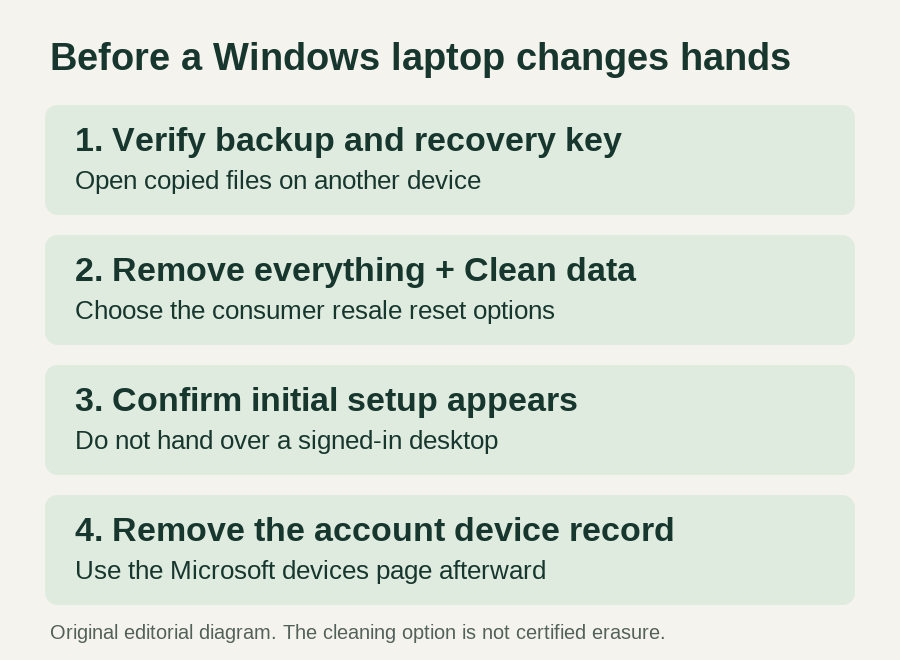
A reset is a poor moment to discover that your only copy of a tax document, photo folder or project file was on the laptop. Copy the files you want to keep to a destination you control. Open a few of the copied files on another device before erasing the laptop. Microsoft also points sellers to Windows Backup, but a backup is useful only if you can get the material back when you need it.
Check separate storage too: an inserted SD card, USB drive or external disk is not part of the laptop's internal reset. Remove any device you are keeping before the handoff. Make a note of software licenses or account access you will need on your next computer; the Windows reset removes installed apps and settings when you choose the full removal option.
Check encryption before starting
Microsoft's reset instructions say to have your BitLocker recovery key available if the device is encrypted. You may not be asked for it during a routine reset, but losing access to the key can stop you if Windows needs recovery. Confirm you can access the key through the account or records that hold it before changing anything on the laptop.
If the computer belongs to an employer or school, ask its administrator for the proper return or disposal process. A personal resale checklist cannot clear an organization's device management or data-retention obligations.
Pick “Remove everything,” then “Clean data”
On Windows 11, open Settings → System → Recovery → Reset PC. On Windows 10, Microsoft lists Settings → Update & Security → Recovery → Reset this PC → Get started. Menu text can vary with the installed version, so use the recovery screen on the device in front of you.
The important choice is Remove everything. Microsoft's Keep my files option retains personal documents, photos and other data, so it is the wrong selection for a sale. Remove everything reinstalls Windows and removes personal files, apps and settings. When the reset presents Clean data, turn it on for a laptop being sold, donated or recycled. Microsoft says that makes recovery of removed files harder and takes more time.
Clean data has a clear limit: Microsoft describes its erasure as a consumer feature that does not meet government or industry data-erasure standards. If the device holds data subject to a formal disposal standard, follow that standard instead of treating this setting as a certificate of secure erasure.
You may also see Cloud download and Local reinstall. These describe where Windows gets the files used to reinstall the system. Microsoft's guide says cloud download gets a fresh copy, while local reinstall uses files already on the laptop. Neither choice replaces Remove everything or Clean data.
Let the reset finish before the handoff
Start the reset only after the backup and key checks are complete. Keep the laptop powered and allow the process to run. Microsoft warns that the screen may stay black for a while and that interrupting the machine's restarts can cause a reset to fail. A brief blank screen is not proof that the laptop has finished erasing.
When Windows reaches its initial setup, check that the machine is no longer showing your desktop or signed-in account. Leave setup for the buyer to complete with their own details. If the reset fails or your account remains visible, resolve that before arranging collection. Do not describe a reset as complete merely because you clicked the button.
Remove the laptop from your Microsoft account
Microsoft's resale guidance puts this step after backing up and resetting. Sign in to your Microsoft account's devices page from another device, find the laptop, review its details and choose the removal action. Microsoft also describes a separate Unlink action for the Microsoft Store device limit. Check the correct device name before removing it, especially if you own several similar laptops.
Account-page removal is housekeeping after the device reset. It does not erase files left on a laptop, so confirm the reset itself reached the setup screen. Keep your backup and any sale record until you have checked your files on the replacement machine and handed over the correct device.
Two questions that matter before you sell
Does “Keep my files” prepare a laptop for resale? No. Microsoft says it preserves personal files. Select Remove everything and the Clean data option for a normal consumer sale.
Does “Clean data” guarantee certified erasure? No. It is Microsoft's consumer cleaning option and makes deleted files harder to recover. Microsoft expressly says it does not meet government or industry erasure standards.
If you are also selling a phone, the device-specific steps differ. See our Android phone sale checklist for Google account and factory-reset handoff checks, or the iPhone carrier-lock guide for a separate carrier-status issue.
For a Chromebook, follow our Chromebook Powerwash and owner-account checklist before handing it to a buyer.