Microsoft Rewards suits existing Bing, Xbox and Microsoft users who want an available noncash reward. Joining is free, but offers take time and vary by region. Choose a useful reward first, then check what earning it requires.
Sources: US-English Microsoft Services Agreement (published July 30, effective September 30, 2026) and Learn about Rewards help, both checked November 15, 2026. These are US-English materials; local offers and conditions can differ.
Microsoft Rewards Review

Earn promotional points through qualifying offers, then choose an available reward. Check eligibility, required points and redemption conditions.
Microsoft Rewards awards promotional points for qualifying offers. The US-English agreement requires an eligible region, an active Rewards account where required, and compliance with the conditions attached to the offer or reward.
Pros
- Free to join and activate Rewards
- Published programme and redemption terms
- Different reward options where offered
- Useful when local offers fit your existing activity
Cons
- Points are not cash or wages
- Offers and rewards can vary by region
- Unredeemed points can expire or be forfeited
How Much Can You Make?
There is no dependable monthly income to quote. Check eligible dashboard activities and the points required for a useful reward before investing time.
Some offers require a separate dashboard claim after completion. Missing Microsoft's claim deadline may forfeit those points; finishing the activity alone may not add them.
Other earning services to compare
Compare Swagbucks and InboxDollars separately if you want another earning service. Check their eligibility, available rewards and withdrawal conditions before joining.




Ways to Earn Points
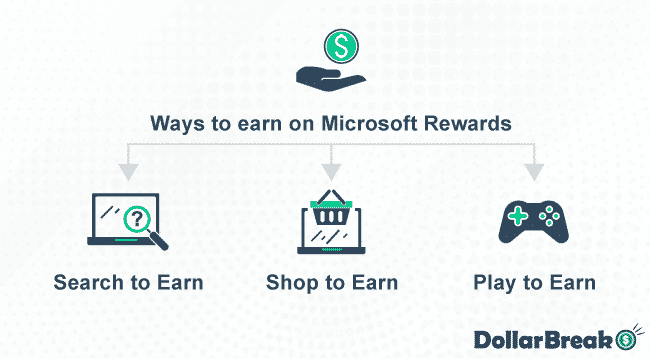
Search To Earn
Bing searches can earn points where offered. A qualifying search is manually entered for genuine personal research; bots, macros and other automated or fraudulent queries do not qualify. Check your account's current limits rather than repeating searches solely for points.
Shop To Earn
Some Microsoft Store purchases or digital acquisitions qualify; not every purchase does. Microsoft's help warns that Store purchases on Xbox and Bing searches may not earn points in every country or region. Read the offer before buying.
Play To Earn
The dashboard and participating Microsoft products can offer other qualifying activities. If you already use Xbox, inspect those offers before changing your routine. For free Xbox gift cards, check availability and the required points in your own account.
Programme rules and account limits
Microsoft Rewards is Microsoft's own promotional programme. The linked Trustpilot page is a separate place to look for member opinions; its rating is not used to estimate Rewards earnings here.
You can use only one Rewards account, even with multiple email addresses. Each household is limited to six. Participation is personal and noncommercial; masking your location with a VPN or similar technology may lead to account cancellation and forfeited points.
Who is Microsoft Rewards For?
It fits people who want useful rewards alongside existing habits. When comparing ways to get paid to search the web, count completion and claim time; conditional rewards will not meet every income need.
How to Sign Up with Microsoft Rewards?
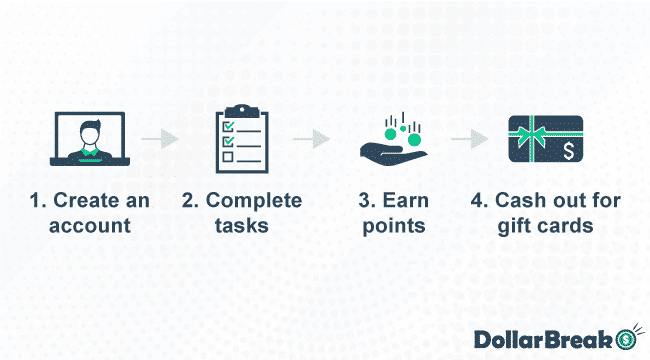
A Microsoft account in a participating region may already be enrolled. Activate the Rewards account before redeeming; earning offers also require an active Rewards account. Then:
- Confirm the programme is available for your residence.
- Use your own Microsoft account and check Rewards activation.
- Read the conditions for the offer you want to complete.
- Review any verification required before choosing a redemption.
How Much Are Microsoft Rewards Points Worth?
Microsoft Rewards points have no cash value or universal currency conversion. Available options include gift cards, sweepstakes and charity donations. Check the specific reward's points price and conditions; entering a sweepstake is different from receiving a gift card.
Keep inactivity and cancellation rules separate
- Use genuine personal activity and comply with each offer.
- Claim points within any deadline shown by Microsoft.
- Keep your account and contact details accurate.
- Review the consequences before cancelling Rewards.
Unredeemed points expire after 12 consecutive months without earning or redeeming any points. Signing in alone is not the activity specified by this expiry rule.
Separately, a Rewards account may be cancelled and its points forfeited after 12 consecutive months without signing into the Microsoft account. Voluntarily cancelling Rewards immediately forfeits earned points; rejoining does not restore them. Rewards cancellation is distinct from closing your Microsoft account. These clauses concern points, rather than a blanket rule about previously redeemed gift cards.
How to Redeem Points with Microsoft Rewards?
Choose an option on the Redeem page only after activating Rewards and holding all the required points. Stock, age and region restrictions may apply. Microsoft may request contact details or a verification code; VoIP and toll-free numbers are excluded from the phone information specified in the agreement.
After redemption, use Order History and Order Details to find the reward code or link. The Resend option sends a copy of the confirmation email.
Redemptions generally cannot be cancelled or returned for a points refund, except for defective products or where the law requires it. Keep your account email current: the agreement says undeliverable rewards will not be reissued.
For an order that was cancelled, a missing email or a verification problem, use our Microsoft Rewards order troubleshooting guide to choose the next step.
What are the Microsoft Rewards Pros & Cons?
Microsoft Rewards Pros
- Free programme membership and Rewards activation
- Published rules for eligible offers and redemptions
- Potentially useful noncash rewards where available
Microsoft Rewards Cons
- No guaranteed monthly return or cash value for points
- Region, stock and offer-specific restrictions
- Separate inactivity and voluntary-cancellation forfeiture rules
Microsoft Rewards Review Verdict: Is Microsoft Rewards Worth it?
Worth considering alongside existing habits; a poor fit for predictable income. Check local rewards, claim deadlines and inactivity rules. Compare the survey sites above for different options.
Microsoft Rewards FAQ
What is Microsoft Rewards?
A free Microsoft loyalty programme offering promotional points toward gift cards, sweepstakes and charity donations where available.
How does Microsoft Rewards work?
Sign into Microsoft Rewards, complete eligible dashboard offers and claim points when required. Redeem when you have enough points for an available option.
Before starting, ask:
- Is the activity eligible for this account and region?
- Does it require a separate claim before a deadline?
- Can the available points purchase a reward you can actually use?
Is Microsoft Rewards free?
Yes, joining and activating Rewards have no charge. A purchase-based offer or costs associated with using a reward can still involve spending.
Is there a Microsoft Rewards app?
You can check the Bing app and Rewards website for access. Use the same Microsoft account, and follow the current dashboard instructions for your region.
Where Microsoft Rewards is available?
Consult Microsoft's list for participating regions. Being able to open the website does not establish eligibility or access to every offer.
Is Microsoft Rewards a scam?
It is operated by Microsoft. Use the official dashboard and support channels, and check the conditions before committing time or buying anything.
Is Microsoft Rewards safe?
Redemptions may require contact details or a fraud-prevention code. Review the requested information and applicable privacy terms.
How to contact Microsoft Rewards customer service?
Start with Rewards help pages, then use the official support form for an account-specific problem. Keep the relevant offer or order reference private and never publish passwords or verification codes.
For an invalid code, first check the reward and redemption link in Order History. Use official support if the issue continues.
Can you get cash from Microsoft Rewards?
No. Points have no cash value and cannot be exchanged for cash or money.
Do Microsoft Rewards points expire?
Yes: after 12 consecutive months without earning or redeeming points. The separate sign-in and voluntary-cancellation rules are explained above.